Pages

Showing posts with label Internet. Show all posts

Now you can edit your YouTube Video Online

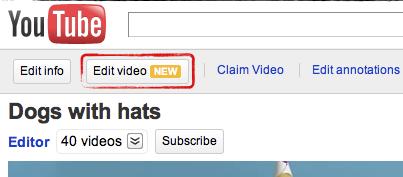
Youtube has added a new feature for its users to edit uploaded video and can make changes as they want. Now you can change sound effect in youtube videos, color etc but you can edit only your youtube video.

Go to My Videos Page and click on Edit video button
Edit Youtube Videos
Edit Youtube Videos
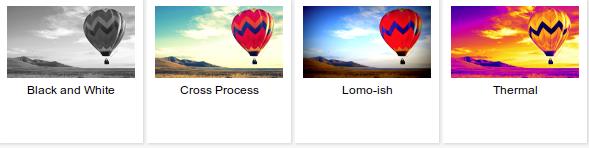
Now you can rotate your video, change contrast, can use "I am Feeling Lucky" to auto color correction and can change effects
Edit Youtube Videos
Add different effects to youtuve Videos
This just a initial stage more cool features will be added in Video editing of Youtube


Check your Website Design in Various Web Browsers

Its very important to know how your website looks in different web browser, because everybody uses different browser and different screen resolution. A website must be compact able with majority of browser to gain readers and visitors. Now a days there are many online services that makes your website compact able for every browser and Operating System at very reasonable rate. But the biggest disadvantage of this service is these service will totally modify your design in different browsers.


Coming back to the point to know how your website looks in different browser in various OS.

1. www.browsershots.org is the first option to use it is very relevant to use. This service is available at free and also in paid method. It allows us to test website design in Linux and its browser, Windows and its browser, BSD and its browser.

2. www.browserlab.adobe.com is the second option it is run by Adobe and is freely available. To use this service you have to register with Adobe. This tool looks very professional but supports 4 browsers Firefox, IE, Chrome and Safari.

How to change name on facebook

Many of us use different name on facebook or on any social networking sites. Every one have its own reason to reasons to change name on facebook Profile, it might be to protect your identity or if you have really changed your name etc etc.


1. Login to your facebook account then go to Account tab next select Account Settings
 2.
faecbook profile name change


3. After changing name it will ask you for password conformation, enter your password and Save Change.

change your facebook profile name
Now refresh your profile or re login you will see your new profile name.

Note: Some time it may take more time to view change

Test your Website in Various Screen Resolutions


Have your ever seen how your website looks in different screen resolutions. There are different screen resolutions as per the size, system and quality of screen. If you want to know how your screen looks in different screen resolution then you can check it from your single browser. Check this out www.viewlikes.us. ViewLikes will provide you results for iPhone resolution, WiiBrowser, 800*600, 1024*768 (Most popular), 115*864 and some more.


Just visit the site and enter your address in URL box provided there and click on Check Up then wait for few seconds and your result is ready

Its totally free to check screen resolution of your website on ViesLikes

10 Most Amazing 3d Street Painting

According to Wikipedia Street painting has arrived from Europe (16th century). Street painting is also known as chalk art, pavement art, sidewalks. Street paintings are mostly popular in USA, Europe, UK a getting popular around the world rapidly.


Here are some Best and Most Amazing street paintings I found on internet check out.


Wikipedia Pilot Campus Ambassador program India How to join

Wikipedia Campus Ambassador program is part of Wikimedia Public  Policy initiative project which was first launched in United States in year  2010 with top Universities Harvard University, Indiana University,  Georgetown University, UC Berkeley and many other colleges and now it  will launch in Pune (INDIA).

Wikipedia Campus Ambassador will start in May 2011 in Pune and will  spread to other region of India by September 2011. Pune was chosen for  this event because of its huge numbers of colleges in the city.


Who can be Wikipedia campus Ambassadors?

Undergraduate, Graduate or Postgraduate student, Faculty College or  University staff members or any person close to college or university.


What you will get as Wikipedia campus Ambassadors?

Training, presentation and free workshops.
The Ambassadors will not be paid in monetary term but will be given training  material, merchandise. If you are running event about Wikipedia them you  will be paid.
Knowledge about Wikipedia
Chance to work online with College, University, Teachers
Invitation in other Wikimedia events.


How to Apply or Join Wikipedia campus Ambassadors?

If you are interested and want to join this program then download below given form and after filling it email it to
Email : ambassadors-ind@wikimedia.org

Download PDF format here

Download Google Doc format here


Watch most popular video of the day


 12Vid is a site which gives you list of top 12 video of the day not only from Youtube but also from all other video platform. This service help us to know which video is popular today without visiting all the video site on the web. You can share and get daily videos on facebook and can browse videos by categories.


12vid

20 Indian online (ad) advertising network


This is list of top and best 20 Indian advertising network which will help you find right advertising network for your Indian traffic of your website.

The number of internet user in India has grown to 71 million according to IMRB report and 66% growth in online ad spending. Online advertising are very popular now a days and are growing rapidly in India. As online shopping fashion is popular now a days and has increased and still increasing rapidly in India. Online advertising is advantageous for both advertiser and publisher. So check out the list...


admagnet Indian online advertising network1. Admagnet 
Launched in 2008
Admagnet is one of the largest and fastest growing ad network in India and claiming 197 million page view per month and 600+ million impression per month and having 51% of Indian internet population covered by admagnet. Admagnet achieved this huge success within 2 years and also considered as 4th largest digital media in world for its Unique users which they have. The minimum requirement to join Admagnet is minimum 1 million page view per month.

Type of ads CPM (Cost Per Mile), CPC (Cost per Click)


sulekha advertising network


2. Sulekha Adnetwork 

Launched in 2001
Sulekha is the leading Internet company in India providing services like Classifieds, Yellow pages, Socail media and it is one of the best local serch engine. Website Sulekha Adnetwork dosent have any direct joining option to it If you want to join this network then you have to drop a mail to the mail id given on website.


komli online advertising network

3. Komli 


Launched in 2006
Type of ads : CPM and performance based.
Komli is one of the oldest digital media service in India and it has always been on top in India. It has various types of advertising format to choose from for both advertiser and publisher. Komli has kept improving its technology and introduced many new format continously.


Ybrant digital advertising network
  4. Ybrant Digital
Launched in 1991
Ybrant Digital had acquired many digital media company like Lycos, Max Interactive, Oridian etc.
Ads, Facebook marketing, Mobile ads, Gaming ads.


ibibo advertising network

5. Ibibo ad network
Launched in 2006
Ibibo.com the biggest social networking site in India owns this ad network. Ibibo ad network is a performance based or affiliate ad network.


bixee adx network6. Bixee Adx 
Launched in 2005
Bixee is owned by ibibo.com and bixee help to increase revenue by adding a search bar (job, education, travel) in website and every time some one make search it makes money for you.


ozone media online advertising network

7. Ozone Media
Launched in 2006
Ozen media has large number of top Indian brands Advertisers and Publishers in its pocket. It provides CPM (Cost Per Mile), CPC (Cost per Click) and CPL (Cost Per Lead). It have some minimum reuirement for publishers to join it.


DGMIndia online advertising network 
8. DGM India 
Launched in 2007
DGM India is a wholly owned subsidiary of Asia Digital Holdings plc. DGM mainly deal with affiliate marketing if your are earning through affiliate marketing or want to earn than DGM is the best option.
Affiliate, CPA, CPC


inviziads online advertising network

9. Inviziads


Inviziads is special ad network for gaming website. If you are having gaming website and you don't know how to implement ads in games then you need not worry Inviziads will do it for you. You just have to send require code to them and they will do rest of the things.


admaya online advertising network

10. Admaya
Admaya is also show ads on your search engine of your blog mainly google adsense provide this service by its custom search bar but if you don't have adsense account then admaya is an alternative.


tyroo online advertising network

11. Tyroo 
Launched in 2006
Tyoo is leading Intenet advertising company in India. 35% of stakes of Tyroo are been acquired by Yahoo. Tyroo have some biggest clients like Microsoft, HP, Dell, Samsung etc


pubmatic advertising network

12. Pubmatic 
Launched in 2006
Komli is the parent network of Pubmatic. Its a ad management solution for publishers to maintain hassle free way to monetize website.


adchakra advertising network


13. Adchakra
Adchakra have a very cool feature of Search engine advertising for its advertiser in which the advertiser have to choose geographical region where his ads must be seen.
Type of ads CPM 


networklay advertising network

14. Networkplay


axill advertising network15. Axill


foxnetworks advertising network

16. FoxNetworks


ads for indians advertising network17. Ads  for Indians


18. Indiads


adonmedia advertising network19. Adson Media


tonictag advertising network
20. Tonictag


What to do when some one keep clicking your adsense ads

fraud clicks adsense


It may happen that you clicked accidentally on your own adsense ads for which google may not penalize you until you hit multiple clicks because Google know that it may happen doesn't take it seriously.

A normal Page CTR of google adsense is 2-5 % and suddenly your Page CTR goes to 15-30 %. Its not a good news don't be happy that your CTR has increased it means that some one is trying to terminate your account by clicking fraud ads hits. Google will terminate your adsense account if it finds such a huge CTR with fraud clicks.
Now the question arises what to do for this issue ?
The solution is very simple you just have to report this issue to google. You can submit it by the given below link.
CLICK HERE

After visiting this link you just have to fill the given form and submit it. Google will take into consideration that you have not done it and will not terminate your account.

Download facebook photo albums - Firefox addons

If you want to download photo albums from your facebook account than FacePAD is the best and easiest firefox addon to download your facebook albums.

Download Here

After downloading

1. Go to your facebook album and right click on and select the option 'Download album with facePAD' as shown in the below image.


Blogs accepting Guest post and Adsense revenue sharing


1. Shoutmeloud
PR    4    Alexa Rank  3k+


2. Devilsworkshop
PR    4    Alexa Rank  14k+


3. Tricksdaddy
PR    4    Alexa Rank  23k+


4. Serradinho
PR    4    Alexa Rank  59k+


5. Techhamlet
PR    4    Alexa Rank  65k+


6. Callingallgeeks
PR    3    Alexa Rank  18k+


7. Techmaish 
PR    3    Alexa Rank  19k+


8. Themobicrunch 
PR    1    Alexa Rank  327k+


9. Mobilewix
PR    0    Alexa Rank  149k+

Send free MMS worldwide no signup

free mms

SeaSMS is a free service which which allows you to send free MMS worldwide without any registration. You can send image, document, video, audio ans size upto 5000 KB The steps are quite easy to send MMS


1. go to seasms.com and navigate to left you will see a option name 'Browse' by which you have to browse the file from your computer and select and hit on 'SEND MMS' button 


2. In same place you will see a different screen asking you if you want to send this MMS to India or out of India select your destination.


3. Again a new fresh screen will appear asking for number of the person to whom you want to send MMS and your name and after inserting required detail now hit 'Send' within few second the person will receive MMS.

The person who have received MMS will get a text message with the link of MMS and he can view that by visiting that link and download


Facebook fan page updated features

Today morning when I logged in to my facebook fan page account I was surprise to see some upgraded feature added in it. Check out what upgraded are added on facebook fan page.


 These are the following category in which changes are been made


Navigation are now on left side which make it easy to use.


Some new settings are been integrated like Page Visibility etc


This is what I like the most Facebook recommend page similar to your niche and your page in others profile it will increase fan numbers.


Now latest photo are displayed on top.


Use facebook as your page         
 
Like blogs now top post will be shown on facebook fan pages